⌨️ Health & Lifestyle
⌨️ 10-Finger Touch Typing Trainer & Keyboard Speed Test
Master touch typing with 10 fingers. Practice guided keyboard lessons, track words per minute (WPM), and enjoy authentic typewriter sound feedback.
✓ 100% Free (Forever free)
✓ No Registration Required
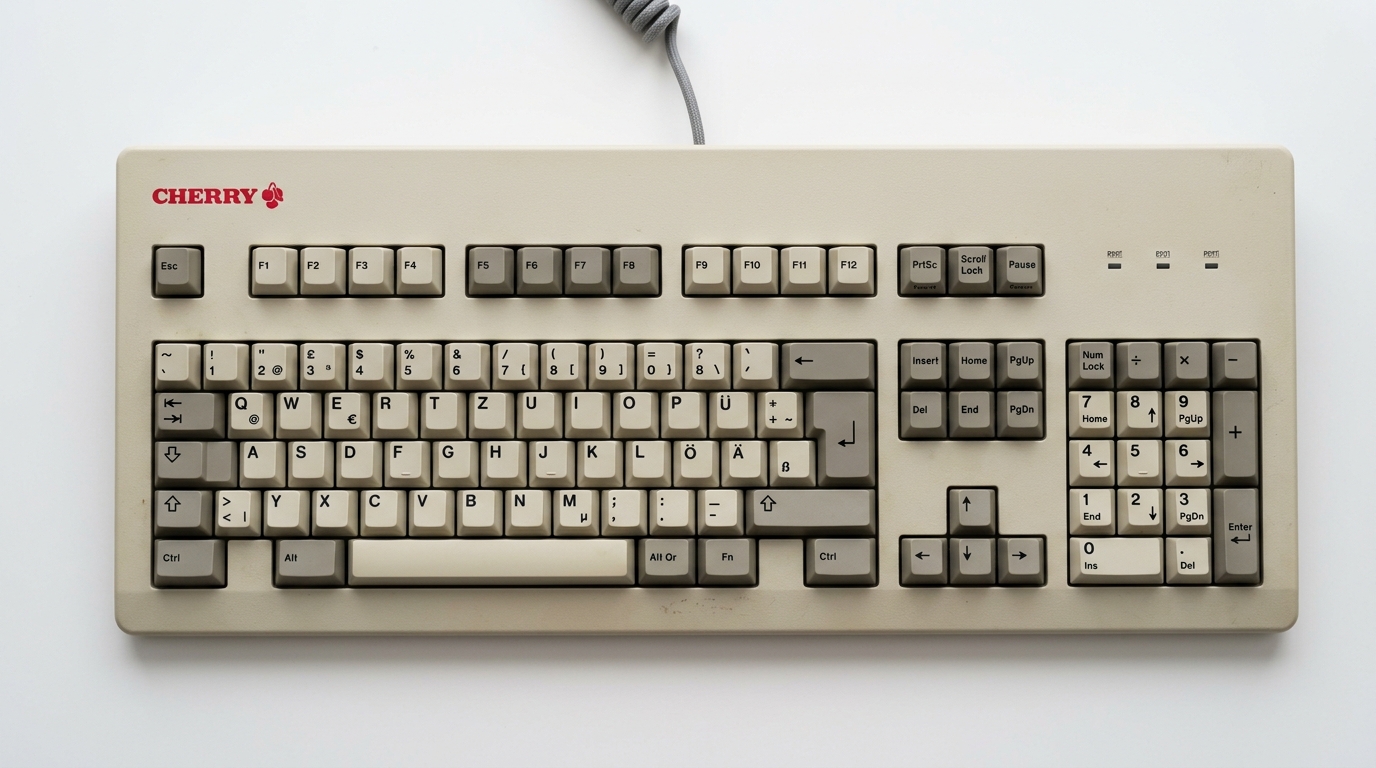
✓ DIN 2137 Tastatur (102 Tasten)
✓ Akustisches Bass-Feedback
✓ 100% Privacy (Computed locally)
ff jj f j fj jf f j ff jj fj jf j f fjj jff fjf jfj f j ff jj f f j j fj jf ff jj
+========================================================================================================================+
| [ASCII] DEUTSCHE 102-TASTEN TASTATUR (DIN 2137) [NUM:●] [CAPS:○] [ROLLEN:○] |
+========================================================================================================================+
[Esc]
[F1]
[F2]
[F3]
[F4]
[F5]
[F6]
[F7]
[F8]
[F9]
[F10]
[F11]
[F12]
[^°]
[1!]
[2"]
[3§]
[4$]
[5%]
[6&]
[7/]
[8(]
[9)]
[0=]
[ß?]
[´`]
[ <-- ]
[Tab⇥]
[ Q ]
[ W ]
[ E ]
[ R ]
[ T ]
[ Z ]
[ U ]
[ I ]
[ O ]
[ P ]
[ Ü ]
[+*]
[ENT↵]
[Caps⇪]
[ A ]
[ S ]
[ D ]
[ F_]
[ G ]
[ H ]
[ J_]
[ K ]
[ L ]
[ Ö ]
[ Ä ]
[#']
[ ]
[Shift⇧]
[<>]
[ Y ]
[ X ]
[ C ]
[ V ]
[ B ]
[ N ]
[ M ]
[,;]
[.:]
[-_]
[ Shift ⇧ ]
[Strg]
[Alt]
[ L E E R T A S T E ]
[AltGr]
[Strg]
[Druck]
[Roll ]
[Pause]
[Einfg]
[Pos 1]
[Bild↑]
[Entf ]
[Ende ]
[Bild↓]
[ ↑ ]
[ ← ]
[ ↓ ]
[ → ]
NUM
CAPS
ROLL
[Num]
[ / ]
[ * ]
[ - ]
[ 7 ]
[ 8 ]
[ 9 ]
[ + ]
[ 4 ]
[ 5_]
[ 6 ]
[ | ]
[ 1 ]
[ 2 ]
[ 3 ]
[ENT]
[ 0 ]
[ , ]
[ ↵ ]
+========================================================================================================================+
Kleiner Finger
Ringfinger
Mittelfinger
Zeigefinger
Daumen (Leertaste / Numpad 0)
Disclaimer for all Boulevibe Tools & Calculators
Interactive educational tool. Practice progress is stored locally in your browser.
📖 How the 10-finger touch typing system works
Touch typing assigns each of your ten fingers to specific keys on the home row (ASDF JKL;). By keeping your eyes on the screen, muscle memory takes over.
Formula: Typing Speed = Words per Minute (WPM) | Accuracy (%) = Correct Keystrokes / Total Keystrokes × 100
📊 Typing speed benchmarks
| Skill Level | Words per Minute (WPM) | Keystrokes / Min (CPM) | Productivity & Workplace Benefits |
|---|---|---|---|
| Beginner (Two-finger hunt & peck) | 15 – 25 WPM | approx. 75 – 125 CPM | High error rate, constant eye search on keyboard, fatiguing |
| Casual Typist | 30 – 45 WPM | approx. 150 – 225 CPM | Average office standard, moderate productivity |
| Fluent 10-Finger Typist | 50 – 65 WPM | approx. 250 – 325 CPM | Saves 30–45 minutes of work time daily on keyboard tasks |
| Advanced / Pro Typist | 70 – 90 WPM | approx. 350 – 450 CPM | Fast blind touch typing, ideal for software developers, authors & legal pros |
| Competitive / Stenographer | 100+ WPM | 500+ CPM | Elite tier for transcription, court reporting & high-speed typing |
💡 Top tips to increase your typing speed
- Accuracy before speed: Type slowly and accurately. Speed develops naturally through muscle memory.
- Never look down at the keyboard: Keep your eyes strictly on the screen. Trust tactile bumps and the visual guide.
- Ergonomic posture: Sit upright with relaxed shoulders and wrists floating slightly above the desk surface.
❓ FAQ – 10-Finger Typing Trainer & Speed Test
💬 How long does it take to learn 10-finger touch typing?
With 15 to 20 minutes of daily practice, most people reach comfortable touch typing speeds within 2 to 3 weeks.